
Using External MX Email Servers
To use an email server belonging to another provider, change the MX records. These determine the server used to receive email.
-
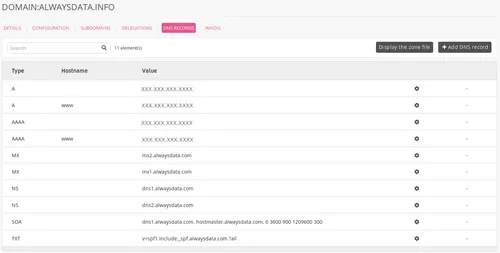
Go to Domains > Details of [example.org] - 🔎 > DNS records ;
-
Choose Add a DNS record,
-
Fill-in the form.
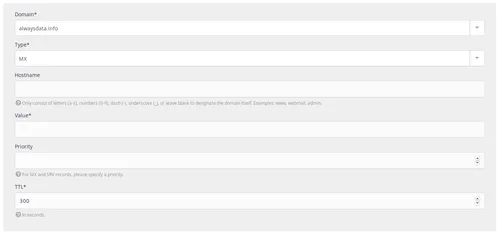 This will automatically disable our MX records.
Caution
Do not put the root into the Hostname.
For example, by putting example.org in this box, you will create a record for example.org.example.org.
Note
A record with @ as hostname for some providers is the empty subdomain. In our case, the Hostname box should be empty.
MX servers for various providers
| Provider | TTL | Priority | Value |
|---|---|---|---|
| Gandi | 10800 | 10 | spool.mail.gandi.net |
| 10800 | 50 | fb.mail.gandi.net | |
| GSuite | 3600 | 1 | aspmx.l.google.com |
| 3600 | 5 | alt1.aspmx.l.google.com | |
| 3600 | 5 | alt2.aspmx.l.google.com | |
| 3600 | 10 | alt3.aspmx.l.google.com | |
| 3600 | 10 | alt4.aspmx.l.google.com | |
| Microsoft Outlook | 3600 | 1 | [id_mx_microsoft].mail.protection.outlook.com |
| OVH | 3600 | 1 | mx0.mail.ovh.net |
| 3600 | 5 | mx1.mail.ovh.net | |
| 3600 | 50 | mx2.mail.ovh.net | |
| 3600 | 100 | mx3.mail.ovh.net |
Note
[id_mx_microsoft] is randomly generated by Microsoft based on the domain name
Bypass MX servers
It may be useful to bypass external MX to reach alwaysdata's MX directly.
To send an email to foobar@example.org through alwaysdata's MX (while example.org uses external MX):
- create the email address in the admin,
- send an email to:
foobar%example.org@mx.alwaysdata.comif the account is located on the Public Cloud,foobar%example.org@server.alwaysdata.comif the account is located on a Private Cloud (serverto replace by the name of the server).