
Configuring SPF/DKIM/DMARC
Here are three methods for authenticating your emails and thereby reducing abusive email use (spam, phishing, etc.).
Sender Policy Framework
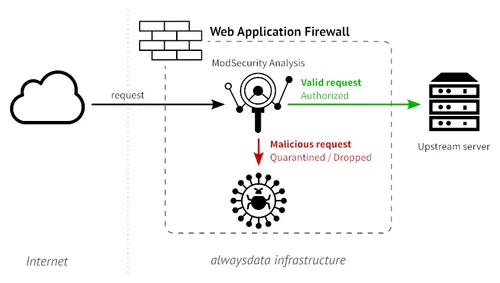
SPF makes a TXT type DNS request to the sender's domain ("MAIL FROM" in the message headers) to find out the list of servers allowed to send emails and compare it with the IP address of the sender's server.
Parameters
| Mechanism | |
|---|---|
| ALL | Default result |
| A | An IN A (or AAAA) record that can be resolved as the sender's address |
| IP4 | IPv4 range |
| IP6 | IPv6 range |
| MX | A Mail eXchanger record pointing to the sender's address |
| EXISTS | The domain is resolved at any address |
| INCLUDE | An included rule passes the test |
| PTR | The IP address domain corresponds to the specified domain and the latter points to the IP in return |
| Qualifiers | |
|---|---|
| + | Favorable result |
| ? | Neutral result |
| ~ | Slight "SOFTMAIL" failure (email accepted but marked) |
| - | Total failure (email normally rejected) |
| Modifiers | |
|---|---|
| exp=some.example.org | To get the reason for the failure results |
| redirect=some.example.org | To link to a rule record in another domain |
Caution
This technology may have an impact on email redirects as the sender server is not necessarily the email server belonging to the original email sender.
At alwaysdata
A SPF record is created by default and can be found in the DNS records tab for the domain:

include:_spf.alwaysdata.comexplicitly allows our servers to send emails,~allsends a slight "SOFTMAIL" failure result for the other sender servers.
If the domain doesn’t use alwaysdata’s DNS servers, you must then, in the DNS service provider, add include:_spf.alwaysdata.com to the SPF registration.
Links
DomainKeys Identified Mail
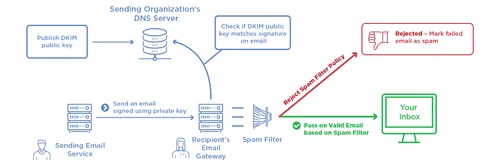
DKIM is used to authenticate the domain name by adding a signature to all of the outgoing emails. Concretely, this works with two keys:
- a private key that is known - and kept secret - from the domain’s mail delivery servers;
- a public key that corresponds to a DNS registration of the
TXTtype.
At alwaysdata
A pair of keys is created by default, whose public key (the TXT record) will be found in the DNS Records tab of the domain:

If the domain doesn’t use alwaysdata’s DNS servers, this record must be recopied with your DNS service provider.
It is possible to generate others in Domains > Details of [example.org] - 🔎 > Configuration.
Links
Domain-based Message Authentication, Reporting and Conformance
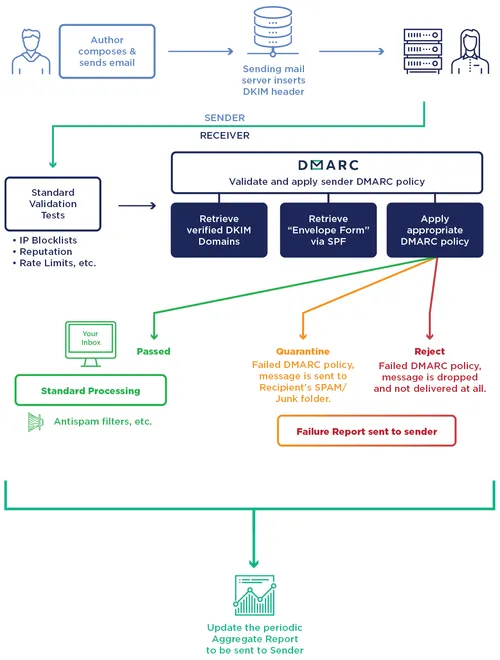
DMARC is a protocol that standardizes authentication by telling the addressees what actions to take should one of the authentication methods fails. It will check that:
- the domain corresponds to the pair of DKIM keys (field d=),
- the sender server is specified in the SPF record for the domain (MAIL FROM),
- the domain is in the email's FROM field.
Note
To use DMARC, DKIM and SPF must already be implemented.
Parameters
| Variables | |
|---|---|
| v | Protocol version: v=DMARC1 (required) |
| pct | Percentage of messages to filter (default: 100) |
| adkim | Coherency with DKIM |
| s = strict mode - the DKIM signature domain must precisely match the FROM | |
| r = relax mode (default) | |
| aspf | Coherency with SPF (s or r) |
| p | Procedure in case of failure - main domain (required) |
| none = delivers the email normally | |
| quarantine = treats the email as suspect (spam score, flag, etc.) | |
| reject = rejects the email | |
| sp | Procedure in case of failure - subdomain (none, quarantine or reject) |
| ruf | Recipient of the detailed failure reports |
| fo | Conditions for sending a detailed report |
| 1 = DKIM and/or SPF failure | |
| d = DKIM failure | |
| s = SPF failure | |
| 0 = DKIM and SPF failure (default) | |
| rua | Recipients of aggregated failure reports |
To implement it, a TXT DNS record needs to be created. At alwaysdata, you will find it in the DNS records tab of the domain:

Links
Explanatory diagrams reused from Global Cyber Alliance