
Creating your Own Installation Script
Any user may propose a script in the language of their choice allowing users to install their application. This script will be run with the permissions for the account where installation took place and must start with a YAML format comment.
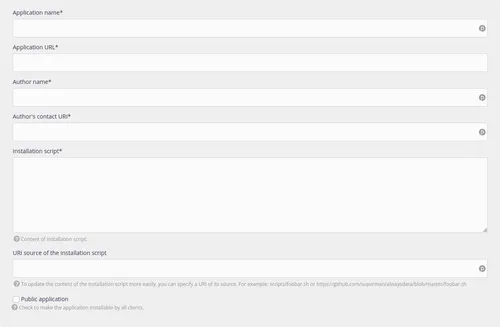
Scripts comprise two parts:
-
the YAML format dataset for configuring the site and requesting the information required by the script (the
FORM_*variables) from the user. It can be split into four:- site: refer to the API documentation that restates all of the possible options.
- database: mysql, postgresql, couchdb, rabbitmq.
- requirements: specify limiting requirements which blocks their installation on certain plans.
- form: all of the variables requested from the user creating the site. Example: site title, administrator ID, email address, administrator's name, etc.
-
the actual script.
Environment variables
| Variables | Description | Example |
|---|---|---|
| USER | Account name | foo |
| HOME | Account root for the script | /home/foo/example/ |
| APPLICATION_NAME | Application name | |
| INSTALL_URL | Site address | foo.example.net/test |
| INSTALL_URL_PATH | Site root (base URL) | /test |
| INSTALL_URL_HOSTNAME | Site host name | foo.example.net |
| INSTALL_PATH_RELATIVE | Relative path from the account root (without final slash) | example |
| INSTALL_PATH | Absolute path (without final slash) | /home/foo/example |
| DATABASE_USERNAME | Database connection user (managed automatically) | foo_* |
| DATABASE_PASSWORD | User password for database connection (managed automatically) | |
| DATABASE_NAME | Site database (managed automatically) | foo_* |
| DATABASE_HOST | Host name for database server connection | mysql-foo.alwaysdata.net (base MySQL) |
| SMTP_HOST | Host name for mail sending server connection | smtp-foo.alwaysdata.net |
| RESELLER_DOMAIN | Root domain used by the hosting provider | alwaysdata.net |
| FORM_* | Other variables explicitly requested from the user in the "form" section in the YAML dataset | |
| PORT | Specific port for User program, Node.js, Elixir, .NET or Deno type sites | |
:: or IP | Specific port for User program, Node.js, Elixir, .NET or Deno type sites (prefer :: to IP) |
If other variables are needed, open a support ticket.
Notes and tips
- The script needs to start with
set -eto stop it when it fails, - Specify the version of the language used (PHP, Python, Ruby, Node.js and Elixir). This is recommended to avoid being dependent on the default account configuration,
- The root directory specified by the user (
INSTALL_PATH) serves as the root for a script (anexport HOME=is run by default), - To make an installation script public, you must specify the
diskcondition in therequirements, - It is preferable to request a minimum amount of information to avoid making the script an exhaustive one. Users may change the configuration of their application later on.
- To add an optional form field, set the
requiredoption tofalse. If the user does not specify anything, the field remains blank, - Labels and regex_text are translatables. Depending on the language chosen in its alwaysdata administration interface, the user can have the form questions in the specified languages.
Note
To make a script accessible to alwaysdata platform users, check the box to make it public. Any script marked as public must be maintained and will at least be checked by the alwaysdata team.
Tip
A deposit URL may be provided to make maintenance easier. In this case, once the changes are pushed to the deposit all that remains is to update the application via the button provided.
Examples
- Odoo installation script
#!/bin/bash

# Declare site in YAML, as documented here: https://help.alwaysdata.com/en/docs/development/marketplace/build-application-script/
# site:
#     type: user_program
#     working_directory: '{INSTALL_PATH_RELATIVE}'
#     command: '.venv/bin/python odoo-bin --config=.odoorc --http-port=$PORT'
# database:
#     type: postgresql
# requirements:
#     disk: 1400

set -e

# https://www.odoo.com/documentation/19.0/administration/install/source.html
# https://www.odoo.com/documentation/19.0/administration/on_premise/deploy.html#builtin-server
# https://www.odoo.com/documentation/19.0/developer/reference/cli.html

export PYTHON_VERSION=3.13
export NODEJS_VERSION=24

git clone -b 19.0 --depth 1 https://github.com/odoo/odoo.git .

npm install -g rtlcss

# Create virtualenv & install dependencies in it
python -m venv .venv
source .venv/bin/activate

pip install --upgrade pip
pip install -r requirements.txt

mkdir -p odoo-data

# Configuration
cat << EOF > .odoorc
[options]
db_name = $DATABASE_NAME
db_user = $DATABASE_USERNAME
db_password = $DATABASE_PASSWORD
db_host = $DATABASE_HOST
addons_path = $INSTALL_PATH/addons
data_dir = $INSTALL_PATH/odoo-data
email_from = $USER@$RESELLER_DOMAIN
http_interface = ::
EOF

# Install
python odoo-bin --config=.odoorc --init --no-http --stop-after-init

# Default credentials for first login: admin / admin
The disk:1400 condition specifies that the Odoo installation requires 1400 MB of disk space. The Free plan is therefore too tight.
- Backdrop installation script
#!/bin/bash

# Declare site in YAML, as documented here: https://help.alwaysdata.com/en/docs/development/marketplace/build-application-script/
# site:
#     type: php
#     path: '{INSTALL_PATH_RELATIVE}'
#     php_version: '8.5'
# database:
#     type: mysql
# requirements:
#     disk: 60
# form:
#     language:
#         type: choices
#         label:
#             en: Language
#             fr: Langue
#         choices:
#             de: Deutsch
#             en: English
#             es: Español
#             fr: Français
#             it: Italiano
#     site_name:
#         label:
#             en: Site name
#             fr: Nom du site
#         max_length: 255
#     email:
#         type: email
#         label:
#             en: Email
#             fr: Email
#         max_length: 255
#     admin_username:
#         label:
#             en: Administrator username
#             fr: Nom d'utilisateur de l'administrateur
#         regex: ^[ a-zA-Z0-9.+_-]+$
#         regex_text:
#             en: "It can include uppercase, lowercase, numbers, spaces, and special characters: .+_-."
#             fr: "Il peut comporter des majuscules, des minuscules, des chiffres, des espaces et les caractères spéciaux : .+_-."
#         max_length: 255
#     admin_password:
#         type: password
#         label:
#             en: Administrator password
#             fr: Mot de passe de l'administrateur
#         min_length: 5
#         max_length: 255

set -e

# https://docs.backdropcms.org/documentation/system-requirements
# https://github.com/backdrop-contrib/bee/wiki/Usage

wget --no-hsts https://github.com/backdrop-contrib/bee/releases/download/1.x-1.1.0/bee.phar
php bee.phar download-core
php bee.phar install --db-name=$DATABASE_NAME --db-user=$DATABASE_USERNAME --db-pass=$DATABASE_PASSWORD --db-host=$DATABASE_HOST --username=$FORM_ADMIN_USERNAME --password=$FORM_ADMIN_PASSWORD --email=$FORM_EMAIL --site-mail=$USER@$RESELLER_DOMAIN --langcode=$FORM_LANGUAGE --site-name=$FORM_SITE_NAME --auto
Use the regex_text condition to explain the regex with words.